User: admin
QubeVu Manager
>
Admin Tools
>
Setup
> Display Settings
Device: idim
| Address: 192.168.0.245
Operator
Display
Customer
Display
Update the values and click "Save" to save the changes or "Cancel" to return.
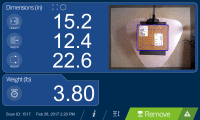
Display screen version:
Language to display:
Scan button's capture definition:
USB monitor:
Weight panel display:
Dimweight panel display:
QR output format:
latest
1
2
Thumbnail >
English
Français
Deutsch
Loading...
Loading...
automatic
hidden
automatic
hidden
Page path:
Preview
Update the values and click "Save" to save the changes or "Cancel" to return.
Display screen version:
Language to display:
USB monitor:
Weight panel display:
Dimweight panel display:
latest
1
2
Thumbnail >
English
Français
Deutsch
Loading...
automatic
hidden
automatic
hidden
Page path:
Preview